Use digital tools to simplify admin work
Digital tools can greatly simplify your organization’s administrative work. Here are a few must-have tools to help you:
Invoicing software: to quickly create invoices and track payments.
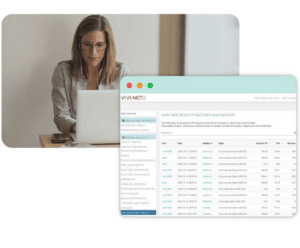
Viviarto is association and club management software that offers several features to help organizations manage their invoicing efficiently.
First, Viviarto lets users create customized invoices with all the necessary information, such as the organization’s contact details, order details and amounts. Users can also add notes and comments to each invoice for added clarity.
Viviarto also lets you send invoices directly to clients by email, making them easier to receive and helping avoid late payments. Clients can also receive payment notifications about unpaid or overdue invoices.
Viviarto also lets users track payments in real time, so they know exactly where each invoice stands. Users can see the status of every invoice, including unpaid, pending, paid or refunded invoices. This makes financial management easier and reduces errors.
Finally, Viviarto provides detailed billing reports that help users understand their organization’s financial situation. These reports can be exported as CSV files for use in other applications, allowing deeper analysis of financial data.

Document management software: to easily store and find your contracts, quotes, purchase orders and other important documents.
Document management software can make professionals’ lives much easier. It helps them easily store and find contracts, quotes, purchase orders and other important documents. No more wasting time looking for a misplaced document or flipping through piles of paper. With document management software, you can scan all your administrative documents and sort them by category. With an advanced search function, you can then find any document in one click. This helps you save time and work more efficiently by making sure all important documents are easy to access.
One example of document management software is Dropbox. It lets you easily store and share files online, sync them across devices and access them at any time. It also has advanced security features to protect your data. Other examples include Google Drive, OneDrive and Box.


Expense management software: to make it easier to manage your team’s business expenses.

Expense management software helps you better manage your team’s business expenses. With this tool, you can easily collect, sort and approve expense reports. You can also track allocated budgets to make sure spending follows your organization’s rules. All of this saves time and helps avoid mistakes when managing expenses.
One example of expense management software is “Expensify“. It lets team members submit their business expenses and lets managers approve and reimburse them easily.
Project management software: to better track project progress and make communication between team members easier.
Project management software helps you better plan and track the different stages of your projects, as well as manage resources and deadlines. It also makes communication easier between team members by centralizing information and letting everyone follow the project’s progress in real time.
One example of project management software is Trello. It lets you create task boards and track their progress in real time. It also makes communication between team members easy and gives a clear view of each stage of the project.
You can also use member management software to make your organization easier.

Automate recurring admin tasks
Automating recurring tasks can save you a lot of time and make you more efficient. Here are a few examples of tasks you can automate:
Sending payment reminders to late-paying clients.
Sending payment reminders to late payers is an important task to keep your organization financially healthy. Following up manually with every late-paying client is often tedious. That’s why online payment software for associations that handles payment reminders can be very useful. This type of software automatically sends personalized payment reminders based on each late payer’s situation. It saves time and helps you manage your organization’s cash flow better.
Following up on quotes awaiting approval.
Following up on quotes awaiting approval is an important task to keep your business running. To do this, you need to keep careful track of where your quotes stand and regularly follow up with clients who haven’t approved them yet. You can use quote tracking tools to automate some tasks, such as sending follow-up emails or creating reminders. This will save you time and improve your follow-up process, while increasing your chances of closing sales.
Automatically updating project tracking dashboards.
Automatically updating project dashboards makes it easy to track the progress of tasks and goals for each project. With this feature, team members can see the project’s status in real time, which makes decision-making and communication between everyone involved easier. This automation also saves time and makes project management more efficient.
Set clear procedures
To avoid mistakes and save time, it’s important to set clear procedures for all administrative tasks. This way, everyone knows exactly what to do and how to do it. Here are a few things to include in your procedures:
Each person’s responsibilities for administrative tasks.
It’s important to clearly define who is responsible for which administrative tasks to avoid duplicate work or things falling through the cracks. For example, you can make one person responsible for invoicing and another for expense reports. This helps distribute tasks better and makes your organization more productive. It also lets everyone focus on their skills and master the tasks assigned to them.
The steps to follow for each type of administrative task.
When handling administrative tasks, it’s important to follow a clear, efficient method. To do this, we recommend defining the steps for each type of task. That way, nothing gets forgotten and everything stays organized. For example, for invoicing, the steps may include creating the invoice, sending it to the client, tracking payment and updating the accounts. By following these steps consistently, you can make sure all tasks are done correctly and on time.
The deadlines for each step.
It’s important to meet deadlines to avoid delays and penalties. Each type of administrative task has deadlines for each step. For example, VAT returns have a filing deadline that must be met. By setting these deadlines in advance and sharing them with all team members, you can avoid delays and keep admin tasks on track.
The tools and software to use for each type of administrative task.
For each type of administrative task, there are tools and software designed to make it easier. For example, for expense reports, there are dedicated apps that let you scan receipts and link them directly to the related expense. For invoicing, there’s software that makes it easy to create invoices and track payments. It’s important to look into the tools available and choose the ones that best fit your needs. And Viviarto is management software for arts and sports organizations. We’re happy to answer any questions — just get in touch here.
Call in admin professionals when needed
It’s important to know when to call in professionals to help with your organization’s admin work. Here are a few situations where it can be useful:
When setting up your organization, to help with the paperwork.
When creating your business, it’s important not to overlook the administrative formalities. We recommend working with a business professional, such as an accountant or a business creation advisor. These experts can guide you through every step of setting up your business, from drafting the bylaws to registration. They can also help you access the grants and subsidies available to new businesses.
When your admin tasks become complex.
If, despite these solutions, you’re still struggling with your organization’s admin work, it may be wise to hire a specialized consultant. They can analyze your specific needs, identify bottlenecks and suggest solutions to make your admin work more efficient. Depending on the issues, this could be a consultant in organization, human resources or management. By working with a consultant, you get an outside perspective and personalized advice to improve your organization’s administration.
When handling special situations (disputes, tax audits, etc.).
When dealing with special situations such as disputes or tax audits, don’t hesitate to call in a legal or tax professional. These experts can support you during these difficult times, advise you on the steps to take and represent you before the authorities if needed. These situations can quickly become complex and stressful, so it’s important to get sound advice to avoid mistakes and penalties. A professional can give you personalized support to handle them as well as possible.
Organize your workspace
A well-organized workspace can make your organization’s admin work much easier. Here are a few tips to organize your workspace better:
Sort your administrative documents regularly to avoid paperwork piling up.
To avoid paperwork piling up — and the time it wastes — it’s essential to sort your administrative documents regularly. This lets you get rid of unnecessary documents and keep only the information that matters to your organization. To do this, you can set up an efficient filing system, using folders or binders, for example. You can also scan your documents and store them on your computer or in the cloud. By sorting your documents regularly, you save time and avoid losing important information.
File your administrative documents by category and in alphabetical order to make them easier to find.
To make your administrative documents easier to find, it’s important to file them by category and in alphabetical order. For example, you can create folders or binders for each category of document, such as invoices, quotes, contracts, bank statements, etc. Then you can sort them alphabetically by supplier, client or document type. This filing method lets you quickly find the documents you need without wasting time. If you prefer digital filing, you can also use keywords or tags to identify each document easily. Either way, it’s important to find a filing method that works for you and to keep it up to date.
Admin work: use storage solutions (binders, storage boxes, etc.) to organize your documents better.
It’s important to store your administrative documents properly so they don’t get lost or mixed up. Using storage solutions such as binders, storage boxes or shelves can make organizing them much easier. You can also use hanging files for easier access. Don’t forget to label each storage unit so you know at a glance what’s inside.
Conclusion:
Administrative work is an important but time-consuming part of running an association or organization. By applying these practical tips, you can manage the administrative side of your organization better, become more efficient and productive, and focus on what matters most. Feel free to adapt these tips to your organization for the best possible results.